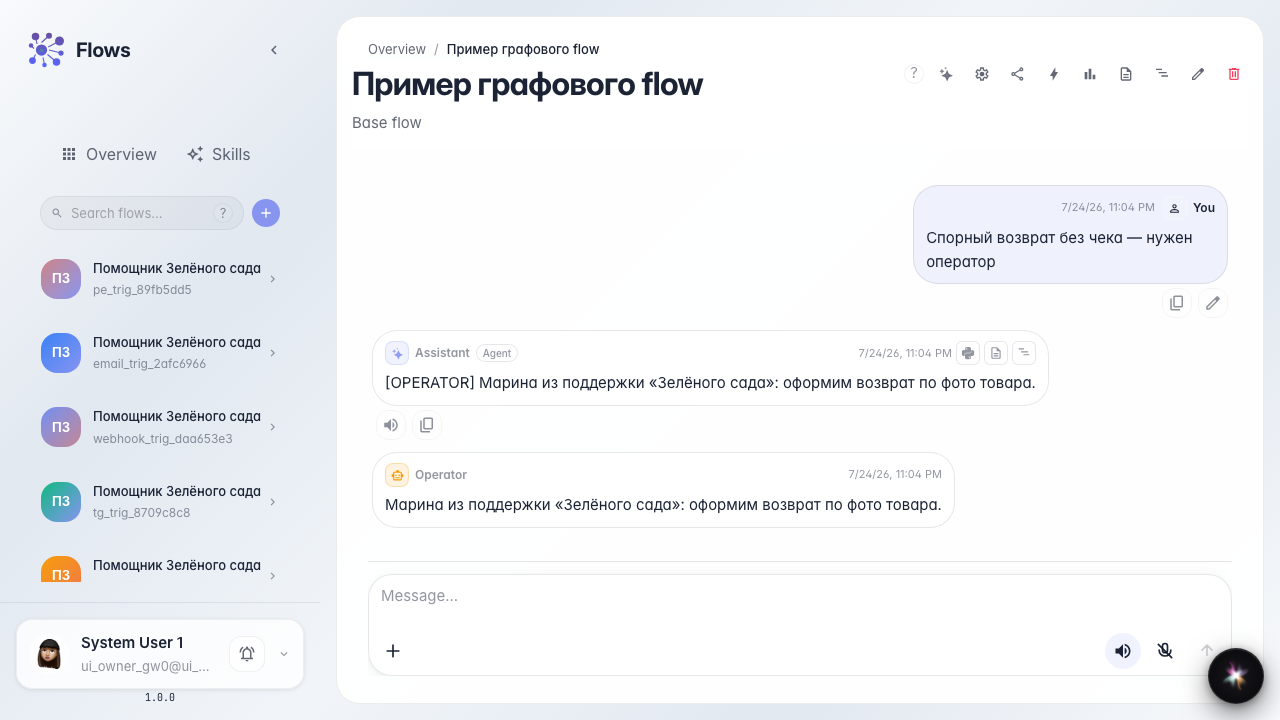
Operator claims a task and replies once
What for: this guide shows the basic loop: the agent handed off — operator Marina replied — the customer dialog continued.
Problems it solves: operators are unsure where agent tasks come from and how to return an answer to the customer chat.
Result: Marina claimed a task from the Customer Support queue, replied, closed it, and the agent continued the dialog.
Step 1. Open the operator inbox
Go to tasks and open inbox. The queue section shows a task from the Green Garden Assistant; complex customer requests land here.

Step 2. Claim the task
Open the task card and click claim. Marina marks that she will answer the customer and sees the request context from the agent chat.

Step 3. Complete the task with a customer reply
Result demonstration. Close the task with the reply text. Marina's support message appears in the customer chat; the agent continues with the operator answer.
Summary. You now know the task path: from agent chat to inbox, claim, reply once, and return the result to the customer.